AppBrain
AppBrain
  • Apps
  • Apps being viewed right now Trending apps today Most popular apps All-time most installed apps Top rated apps iPhone and iPad apps
  • Intelligence ▾
    Intelligence overview → Track any Android app or your whole market
    Track & analyze
    Keyword Tracker & OptimizerTrack & improve Play rankings App Performance ReportOne-off PDF for any app StatisticsFree Android & Play market stats
    Promote your app
    Featured Apps App Links
  • Intelligence
  • Pricing
  • Dashboard
  • Sign up
  • Log in
App Store Apps > Productivity > Pomodoro! Focus & Study Timer
Pomodoro! Focus & Study Timer icon

Pomodoro! Focus & Study Timer

4.0
Jun Tsuda
0.00
0 reviews
Free

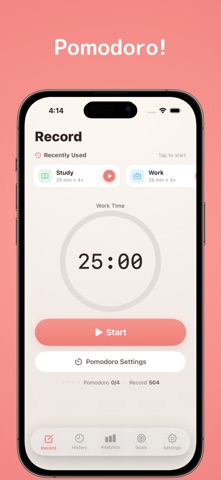
Pomodoro! Focus & Study Timer Screenshot 1 of 5
Pomodoro! Focus & Study Timer Screenshot 2 of 5
Pomodoro! Focus & Study Timer Screenshot 3 of 5
Pomodoro! Focus & Study Timer Screenshot 4 of 5
Pomodoro! Focus & Study Timer Screenshot 5 of 5
Screenshots by Jun Tsuda, from the the App Store listing
View on the App Store

AppBrain's verdict

Last updated
November 12, 2026
Size
8.59 MB
Official page on the App Store

Share Pomodoro! Focus & Study Timer

User feedback

Ratings and reviews on the App Store

Comments on Pomodoro! Focus & Study Timer for iOS

We don't have enough comments to show example comments. Please check back later.

Store listing

By Jun Tsuda, from the App Store
Description by Jun Tsuda Written by the developer, not by AppBrain. Click to read.
Focus first. Everything else is automatic.
A Pomodoro timer that switches between 25 minutes of focus and 5 minutes of rest on its own.
Every session is logged, and you can see not just how long you focused, but when you focus best.

"How long did I actually work today?"
"I meant to focus, but I picked up my phone again."
One simple timer is enough to start changing that.


■ One tap to start
No setup required. Tap once and your 25 minutes begin.
Focus and break periods switch automatically, so you can stay with the task instead of the clock.
Session length, break length, and the number of sessions are all adjustable, and your recent setups are one tap away.

■ Distracted? Jot it down
When something pops into your head mid-session, like replying to an email, note it with one tap and get right back to work.
Your notes appear together when your break starts, so you can mark them Done or save them for Later.

■ Discover when you focus best
After each session, rate your focus in one tap: Struggled, Okay, or Deep focus.
Focus Insights on the Analytics screen then tells you things like "You focus best on weekdays around 10:00" or "You get distracted more on Monday."

■ Organize by color-coded categories
Sort your sessions into categories such as Study, Work, Reading, or Exercise.
Each one gets its own icon and color, so where your time goes is obvious at a glance.

■ See your effort add up
Completed sessions are saved automatically and charted by day, month, and year.
A calendar view and a streak heatmap turn the days you showed up into something you can actually see.
Records can be edited or added later, so a day you forgot to start the timer isn't lost.

■ Set goals, feel the progress
Set goals by session count or total time, such as 20 hours of study this month or 3 sessions a day.
Per-category goals are supported too, and ring progress shows how close you are.

■ Earn trophies for showing up
3 days, 7 days, 30 days in a row. 10 hours a month, 100 hours a year.
Each milestone unlocks a trophy, so your consistency leaves a mark.

■ Accurate even when the app is closed
Timing stays accurate in the background, and you get a notification when a focus or break period ends.

■ The same records on every device
Works on iPhone, iPad, Mac, and Apple Vision Pro.
iCloud sync keeps your records, categories, and goals identical everywhere.


【Great for】
・Tracking study hours for exams and certifications
・Staying focused while working from home
・Finding the time of day when you focus best
・Building a habit of reading, morning routines, or exercise
・Understanding where your hours actually go
・Anyone looking for a timer that stays simple

【Good to know】
・Every feature is free to use (supported by ads)
・No account or sign-up required
・Your records stay on your device and in your own iCloud

Make focus a habit with Pomodoro!

Questions, requests, or something broken? Reach us anytime from Settings → Contact & Feedback.

Safety and technology

Found in the app by AppBrain
Price
Free
App size
8.59 MB
Content rating
Everyone

Technologies used by Pomodoro! Focus & Study Timer

Releases

Updates seen on the App Store
Version
4.0
Launched
December 2025

No changelog data

Alternatives

Similar apps and more from Jun Tsuda

Alternatives to Pomodoro! Focus & Study Timer

Simple Pomodoro Timer - Doro icon Simple Pomodoro Timer - Doro
DAIKI YUASA
5.0
Free
15 ratings
POMO | 勉強・仕事に集中するためのポモドーロタイマー icon POMO | 勉強・仕事に集中するためのポモドーロタイマー
Toshihide Miyake
0.0
Free
ポモドーロタイマー~最もシンプルなアプリ~ icon ポモドーロタイマー~最もシンプルなアプリ~
Ichito Nitta
0.0
Free
Pomodoro Clock | Focus on work icon Pomodoro Clock | Focus on work
Takatoshi Ichige
0.0
Free
AI Pomodoro Focus Timer Poco icon AI Pomodoro Focus Timer Poco
Yugo Matsuda
5.0
Free
1 ratings
pomo - Pomodoro Focus Timer icon pomo - Pomodoro Focus Timer
Yuta Tobita
0.0
Free
Pomodoro Timer – Focus & Done icon Pomodoro Timer – Focus & Done
MITSUKO MARGOT KUBOTA ONO
0.0
Free
Horizon25 icon Horizon25
JUNICHI HASHIMOTO
0.0
Free

More from Jun Tsuda

Quoto: Quote Storage icon Quoto: Quote Storage
Jun Tsuda
1.0
Free
1 ratings
Timery: Time Tracker Stopwatch icon Timery: Time Tracker Stopwatch
Jun Tsuda
0.0
Free
Sticky Notes - Brainstorming icon Sticky Notes - Brainstorming
Jun Tsuda
0.0
Free
Pop Link: Trace & Match Puzzle icon Pop Link: Trace & Match Puzzle
Jun Tsuda
0.0
Free
Kawaii Diary: Mood Journal icon Kawaii Diary: Mood Journal
Jun Tsuda
0.0
Free
Tasks: To-Do List & Reminders icon Tasks: To-Do List & Reminders
Jun Tsuda
0.0
Free
Hibi — Effortless daily icon Hibi — Effortless daily
Jun Tsuda
0.0
Free
Submemo - Subscription Tracker icon Submemo - Subscription Tracker
Jun Tsuda
0.0
Free

Rankings

App Store top charts

App Store Rankings for Pomodoro! Focus & Study Timer

This app is not ranked

About the app and developer

About Pomodoro! Focus & Study Timer

Pomodoro! Focus & Study Timer is a productivity app developed by Jun Tsuda.

What is the rating of Pomodoro! Focus & Study Timer?

Pomodoro! Focus & Study Timer has no ratings yet.

Is Pomodoro! Focus & Study Timer free?

Pomodoro! Focus & Study Timer is free. The app size is 8.59 MB. The latest version available is 4.0. The last update was on November 12, 2026.

What are the requirements for Pomodoro! Focus & Study Timer?

The app has a content rating of Everyone. The app has been available on the App Store since December 2025.

Pomodoro! Focus & Study Timer is made and published by Jun Tsuda. AppBrain is an independent app data site and isn't affiliated with Jun Tsuda. The app name, icon, screenshots and description belong to Jun Tsuda and are shown as published on the App Store.

Developer information for Jun Tsuda

Jun Tsuda

Address:

Popular Productivity Apps Top new apps Today's trending apps Apps other people are watching Price drops on Google Play
Simple Pomodoro Timer - Doro icon Simple Pomodoro Timer - Doro
POMO | 勉強・仕事に集中するためのポモドーロタイマー icon POMO | 勉強・仕事に集中するためのポモドーロタイマー
ポモドーロタイマー~最もシンプルなアプリ~ icon ポモドーロタイマー~最もシンプルなアプリ~
Pomodoro Clock | Focus on work icon Pomodoro Clock | Focus on work
AI Pomodoro Focus Timer Poco icon AI Pomodoro Focus Timer Poco
pomo - Pomodoro Focus Timer icon pomo - Pomodoro Focus Timer
Pomodoro Timer – Focus & Done icon Pomodoro Timer – Focus & Done
Horizon25 icon Horizon25
Overview Alternatives Reviews Rankings Technology
AppBrain Intelligence premium content

Subscribe now to get full and unlimited access to AppBrain Intelligence. You'll have access to:

  • App Intelligence dashboard (performance timeline, competitor comparison, country rankings, insight cards)
  • Detailed ranking data per app
  • Full timeline per developer
  • Device market shares data per country
  • Unlimited keyword tracking
  • AI assistant access via MCP (Claude, Cursor or any MCP client)
1 Month

$75/mo
(billed every month)

SAVE 0%
Subscribe
3 Months

$65/mo
($195 billed every 3 months)

SAVE 13%
Subscribe
1 Year

$57.50/mo
($690 billed every year)

SAVE 23%
Subscribe
Each subscription will automatically renew 3 days before the expiration date for the same time period. Subscriptions can be cancelled at any time before the renewal.

AppBrain is an app data site, we track rankings, ratings, installs for all apps and games on Google Play and the App Store. AppBrain doesn't host app files or APKs, all install links go directly to the official store. All trademarks are owned by their respective owners.

More apps

  • Top Android apps being viewed
  • Angry Spooky Teacher Return for Android
  • QuickBooks Workforce Android App
  • StrangerCam: Random Video Chat

App statistics

  • Android statistics
  • Google Play Developer stats
  • Trending Android Apps
  • Trending iOS apps
  • Top popular Apps
  • Buy the best Android phone
  • Buy & sell app businesses

About AppBrain

  • Contact
  • Privacy
  • Documentation
  • DMCA takedowns
  • Blog
  • Android app Install tracking and attribution options for the AppBrain ad network
© 2010-2026 - AppBrain