Download Android Apps and Games
AppBrain
  • Apps
  • Apps being viewed right now Trending apps today Most popular apps All-time most downloaded apps Top rated apps iPhone and iPad apps
  • Intelligence ▾
    Intelligence overview → Track any Android app or your whole market
    Track & analyze
    Keyword Tracker & OptimizerTrack & improve Play rankings App Performance ReportOne-off PDF for any app StatisticsFree Android & Play market stats
    Promote your app
    Featured Apps App Links
  • Intelligence
  • Pricing
  • Dashboard
  • Sign up
  • Log in
Last updated on: 2026-09-21
App Store Apps > Health & Fitness > Pulse - Colored Interval Timer
Pulse - Colored Interval Timer icon

Pulse - Colored Interval Timer

1.3.0
Lance Merrill
5.00
1 reviews
Free

Pulse - Colored Interval Timer Screenshot 1 of 8
Pulse - Colored Interval Timer Screenshot 2 of 8
Pulse - Colored Interval Timer Screenshot 3 of 8
Pulse - Colored Interval Timer Screenshot 4 of 8
Pulse - Colored Interval Timer Screenshot 5 of 8
Pulse - Colored Interval Timer Screenshot 6 of 8
Pulse - Colored Interval Timer Screenshot 7 of 8
Pulse - Colored Interval Timer Screenshot 8 of 8
Download from the App Store

About Pulse - Colored Interval Timer

Pulse - Colored Interval Timer is a health & fitness app developed by Lance Merrill.

What is the rating of Pulse - Colored Interval Timer?

Pulse - Colored Interval Timer is rated 5.00 out of 5 stars, based on one rating ratings.

Is Pulse - Colored Interval Timer free?

Pulse - Colored Interval Timer is free to download. The download size is 16.57 MB. The latest version available is 1.3.0. The last update was on September 14, 2026.

What are the requirements for Pulse - Colored Interval Timer?

The app has a content rating of Everyone. The app has been available on App Store July 2026.

Description
A fast, colorful timer for the things you do in chunks — and the things you do until you're done. Intervals, Pomodoro, and open-ended flow sessions. 168 palettes.

WHY PULSE
Every interval timer looks the same — red background, green active state, none of it yours. And they all only count down, so when the work doesn't fit a fixed box you fight the timer.

Pulse counts both directions, brightly, and gets out of your way. Big numbers. Live Activity. Apple Watch. $3.99 once unlocks it all.

FLOW MODE (NEW)
A flow session counts UP. Focus until you decide to stop; the break you earn is proportional to the focus you put in.
• Tap START and go — no countdown, no cap
• Tap BREAK for focus ÷ 5 (or ÷ 4, or ÷ 3). 50 minutes of focus earns a 10-minute break
• Optional target: a chime when you reach it, then it keeps counting — it never stops you
• Optional reminders every 5, 10, 15, 20 or 30 minutes: a soft tick and a haptic
• Works locked: the count-up rides your Lock Screen and Dynamic Island, cues still fire

168 PALETTES, SEARCHABLE
• Coral — bright red + lime + black (the classic)
…and 167 more. Search by color ("orange"), vibe ("neon", "calm"), or era ("70s"). Eight ship free; the one-time unlock opens all 168 and repaints the whole app instantly.

QUICK START IN TWO TAPS
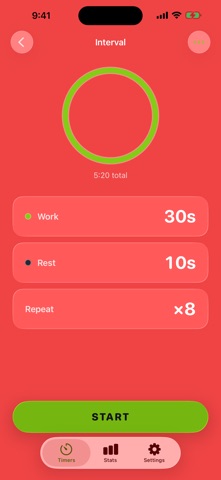
Work, rest, rounds — three tiles and a big START. Or start from a template:
• Flow Session, Flowmodoro 25, Deep Work 90 — the new flow templates
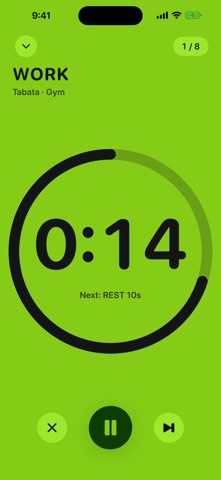
• Tabata — 8 × 20s work / 10s rest
• Pomodoro — 25/5 focus cycle
• Boxing Rounds — 3 min / 1 min corner
Save any setup as a named timer — one tap next time.

WHAT'S INSIDE
• Big-number timer — glanceable across the room, color-coded: focus, work, rest, done
• Live Activity — Lock Screen + Dynamic Island keep ticking in other apps: down in intervals, up in flow
• Beeps + haptics — 3-2-1 countdown and interval cues that fire with the screen locked
• Your timers — save, name, edit, reuse (three free; Pro unlimited)

HISTORY & LABELS
• Label a timer Work, Study, Gym, Boxing — or anything you type
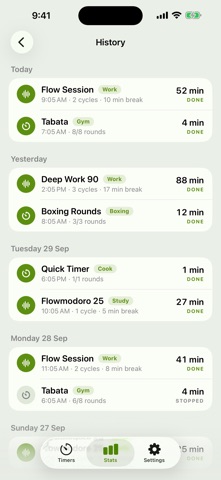
• Every session logged: timer, label, duration, rounds, outcome, grouped by day. Tap any row
• Streak — days in a row with a finished session. No shame, no confetti
• This week's focus time, six stat cards, an activity grid, time by label
• Export CSV (Pro) — your whole history in one file
Free keeps the last 7 days. Pro keeps everything.

SHORTCUTS & CONTROL CENTER
• Ask Siri: "Start a flow in Pulse" — or "Start my Boxing Rounds in Pulse"
• Add "Start Flow" to Control Center or your Lock Screen (iOS 18 and later)
• Both actions work in the Shortcuts app for your automations

ON YOUR WRIST
• Apple Watch app — start any saved interval timer, or Quick Start, from the watch
• Palette-matched work/rest states, haptic taps at every transition
• The watch runs its own timer — it can't drift or freeze
• Flow sessions are iPhone-only for now

WHO IT'S FOR
• Writing, coding and studying — flow sessions, deep work
• HIIT and Tabata circuits, boxing rounds, EMOM
• Pomodoro sprints and focus blocks
• Meditation, breathwork, yoga, cooking, music practice

WHO IT'S NOT FOR
• People who want a workout video library (this is a timer, not a fitness app)
• People who want an app that blocks other apps — Pulse gets out of the way instead
• Anyone looking for a subscription — Pulse is one payment, forever

PRICING
• Pulse Pro — $3.99 one-time: all 168 palettes, unlimited timers, unlimited history + CSV export
• Supporter unlock — $9.99 one-time: same features, bigger thank-you
Flow, labels, reminders, Shortcuts and Control Center are free.

No subscription. No auto-renew. No ads. Ever.

PRIVACY
Pulse runs entirely on-device. No account, no analytics, no tracking, no ad SDKs. Your timers and history stay on your phone. Privacy Policy: https://trypulsetimer.com/privacy.

SUPPORT
support@trypulsetimer.com · https://trypulsetimer.com/support

Time things in chunks. Or go until you're done. $3.99.
Show more Show less

More data about Pulse - Colored Interval Timer

Price Free to download
Rating 5.00 based on a single rating
Ranking Not ranked
Version 1.3.0
App download size 16.6 MB
Suitable for Everyone

Alternative downloads for the Pulse - Colored Interval Timer app

TimerFit: Interval Timer icon TimerFit: Interval Timer
KWANG ROK KIM
0.0
Free
Interval Pulse Timer icon Interval Pulse Timer
Nha Hoang
5.0
Free
1 ratings
Pulse: Interval Timer icon Pulse: Interval Timer
Clarved Inc.
0.0
Free
Stretch Timer - GetFlexy icon Stretch Timer - GetFlexy
Tiny Tools Studio LLC
5.0
Free
1 ratings
Move2Burn icon Move2Burn
DF Training CO
0.0
Free
Timer 4Life-Interval & fitness icon Timer 4Life-Interval & fitness
Eduardo Alves do Nascimento
5.0
Free
4 ratings
Fitness Forever - Mobile icon Fitness Forever - Mobile
Greenjack, LLC
0.0
Free
Fitness Forever icon Fitness Forever
Greenjack, LLC
4.0
Free
4 ratings

More from Lance Merrill

Hard Mode: Daily Discipline icon Hard Mode: Daily Discipline
Lance Merrill
5.0
Free
1 ratings
Contrast Timer icon Contrast Timer
Lance Merrill
0.0
Free

Changelog of Pulse - Colored Interval Timer

No changelog data

Developer information for Lance Merrill

Lance Merrill

Address:

Share Pulse - Colored Interval Timer

Comments on Pulse - Colored Interval Timer for iOS

We don't have enough comments to show example comments. Please check back later.

App Store Rankings for Pulse - Colored Interval Timer

This app is not ranked

Technologies used by Pulse - Colored Interval Timer

Frequently asked questions about Pulse - Colored Interval Timer

Is Pulse - Colored Interval Timer free?

Yes. Pulse - Colored Interval Timer is free to download from App Store.

Is Pulse - Colored Interval Timer still available?

Yes. Pulse - Colored Interval Timer is on App Store, and the last update we saw was on September 14, 2026.

How large is the Pulse - Colored Interval Timer download?

Pulse - Colored Interval Timer is 16.57 MB to download.

Is Pulse - Colored Interval Timer suitable for children?

App Store rates the content of Pulse - Colored Interval Timer as suitable for everyone.

How do people rate Pulse - Colored Interval Timer?

Pulse - Colored Interval Timer has one rating of 5.00 stars on App Store.

Who made Pulse - Colored Interval Timer?

Pulse - Colored Interval Timer was developed by Lance Merrill. It is listed in the health & fitness category on App Store.

What are the best alternatives to Pulse - Colored Interval Timer?

People looking at Pulse - Colored Interval Timer also look at these health & fitness apps: TimerFit: Interval Timer, Interval Pulse Timer, Pulse: Interval Timer, Stretch Timer - GetFlexy, Move2Burn.

Top new apps Popular Health & Fitness Apps Apps other people are watching Today's trending apps Apps on sale
TimerFit: Interval Timer icon TimerFit: Interval Timer
Interval Pulse Timer icon Interval Pulse Timer
Pulse: Interval Timer icon Pulse: Interval Timer
Stretch Timer - GetFlexy icon Stretch Timer - GetFlexy
Move2Burn icon Move2Burn
Timer 4Life-Interval & fitness icon Timer 4Life-Interval & fitness
Fitness Forever - Mobile icon Fitness Forever - Mobile
Fitness Forever icon Fitness Forever

Back to top
AppBrain Intelligence premium content

Subscribe now to get full and unlimited access to AppBrain Intelligence. You'll have access to:

  • App Intelligence dashboard (performance timeline, competitor comparison, country rankings, insight cards)
  • Detailed ranking data per app
  • Full timeline per developer
  • Device market shares data per country
  • Unlimited keyword tracking
1 Month

$75/mo
(billed every month)

SAVE 0%
Subscribe
3 Months

$65/mo
($195 billed every 3 months)

SAVE 13%
Subscribe
1 Year

$57.50/mo
($690 billed every year)

SAVE 23%
Subscribe
Each subscription will automatically renew 3 days before the expiration date for the same time period. Subscriptions can be cancelled at any time before the renewal.

AppBrain is a directory focused on discovering great apps and games. We give statistics, rankings and search options that Google Play and the App Store don't have. All trademarks are owned by their respective owners. AppBrain doesn't offer APKs or binaries, and always lets users install the official version from Google Play or the App Store.

More apps

  • Top Android apps being viewed
  • Super Lucky - Slots Games Android App
  • Personal Fitness Coach Android App
  • fuelGR: fuel prices for Greece

App statistics

  • Android statistics
  • Google Play Developer stats
  • Trending Android Apps
  • Trending iOS apps
  • Top popular Apps
  • Buy the best Android phone

About AppBrain

  • Contact
  • Privacy
  • Documentation
  • DMCA takedowns
  • Articles
  • Blog
  • How to improve the earnings of your ad units
© 2010-2026 - AppBrain