

QuickTerminal - Multi-Shell
QuickTerminal - Multi-Shell is made and published by KAZUHIRO KAKIMOTO. AppBrain is an independent app data site and isn't affiliated with KAZUHIRO KAKIMOTO. The app name, icon, screenshots and description belong to KAZUHIRO KAKIMOTO and are shown as published on the App Store.
AppBrain's verdict
- Last updated
- August 25, 2026
- Size
- 57.2 MB
User feedback
Ratings and reviews on the App StoreComments on QuickTerminal - Multi-Shell for iOS
We don't have enough comments to show example comments. Please check back later.
Store listing
By KAZUHIRO KAKIMOTO, from the App Store

Description by KAZUHIRO KAKIMOTO Written by the developer, not by AppBrain. Click to read.
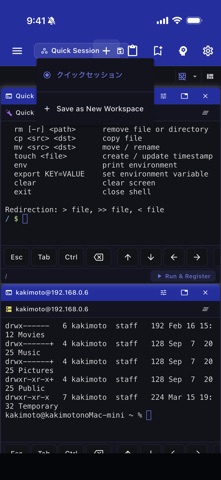
TERMINAL:
- Full xterm-256color terminal emulation
- Local shell support (bash, zsh, fish, sh, ksh)
- Multiple concurrent sessions with tabs
- Horizontal and vertical terminal splitting
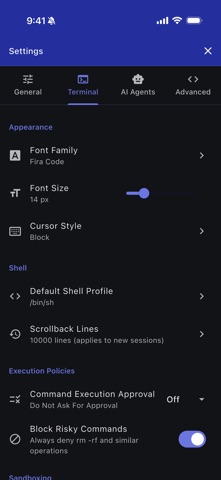
- Customizable fonts: Fira Code, JetBrains Mono, Source Code Pro, Cascadia Code
- Adjustable font size (8–32px) and cursor styles (block, underline, bar)
- Scrollback buffer up to 50,000 lines
SSH & SFTP:
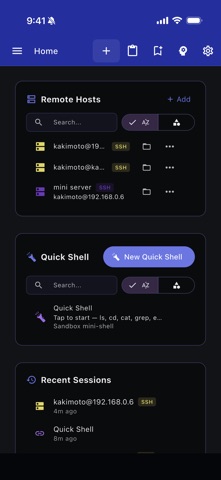
- SSH remote sessions with saved host profiles
- Key-based and password authentication
- SSH jump host / bastion support
- SFTP file browser for remote directories
- Connection pooling and session reuse
- Secure credential storage
AI ASSISTANT (Pro):
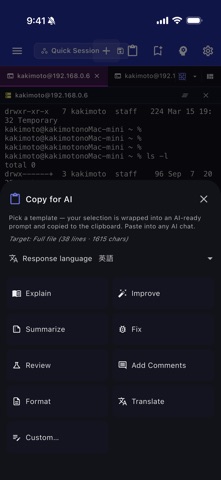
- Claude and Gemini AI integration
- Natural language command suggestions and explanations
- Command safety analysis before execution
- Context-aware help with working directory and git status
COMMAND TOOLS:
- Command snippets: save, categorize, search, and import/export as JSON
- Command history with search, favorites, and directory tracking (500 entries)
- Command palette for unified search across actions and snippets
SECURITY POLICIES:
- Command approval modes: None, Risky Only, Always
- Risky command detection (rm -rf, mkfs, dd, shutdown, etc.)
- Directory-based sandboxing with allowed paths
- Configurable safety levels
WORKSPACE:
- Dockable floating panels
- Integrated file browser
- Resizable sidebar with icon-only mode
- Grid and tabbed layout modes
CUSTOMIZATION:
- 20+ theme colors with dark/light mode
- Customizable keyboard shortcuts
- Responsive layout for mobile, tablet, and desktop
ADVANCED CONNECTIVITY:
- Mosh (Mobile Shell) for resilient connections over flaky networks
- Port forwarding with local and remote SSH tunnels
- GCP IAP tunneling for Google Cloud SSH access
QuickTerminal Pro unlocks:
- Unlimited AI agent execution
- Ad-free experience
- Advanced security policies
- Priority support
Terms of Use: https://kakitiro.com/quickapps/quickterminal/terms/
Safety and technology
Found in the app by AppBrain- Price
- Free
- App size
- 57.2 MB
- Content rating
- Everyone
Technologies used by QuickTerminal - Multi-Shell
Releases
Updates seen on the App Store- Version
- 5.1.31
- Launched
- May 2026
No changelog data
Alternatives
Similar apps and more from KAZUHIRO KAKIMOTOAlternatives to QuickTerminal - Multi-Shell


More from KAZUHIRO KAKIMOTO


Also available on Google Play

Rankings
App Store top chartsApp Store Rankings for QuickTerminal - Multi-Shell
About the app and developer
About QuickTerminal - Multi-Shell
QuickTerminal - Multi-Shell is an overall app developed by KAZUHIRO KAKIMOTO.
User Ratings
The app has no ratings yet.
App Information
QuickTerminal - Multi-Shell is freely available from the App Store. The app size is 57.22 MB. The latest version available is 5.1.31. The last update was on August 25, 2026.
Technical Requirements
The app has a content rating of Everyone. The app has been available on the App Store since May 2026.
Developer information for KAZUHIRO KAKIMOTO
Address:
Frequently asked questions about QuickTerminal - Multi-Shell
Is QuickTerminal - Multi-Shell free?
Yes. QuickTerminal - Multi-Shell is free on the App Store.
Is QuickTerminal - Multi-Shell still available?
Yes. QuickTerminal - Multi-Shell is on the App Store, and the last update we saw was on August 25, 2026.
How large is QuickTerminal - Multi-Shell?
QuickTerminal - Multi-Shell is 57.22 MB.
Is QuickTerminal - Multi-Shell suitable for children?
App Store rates the content of QuickTerminal - Multi-Shell as suitable for everyone.
Who made QuickTerminal - Multi-Shell?
QuickTerminal - Multi-Shell was developed by KAZUHIRO KAKIMOTO. It is listed in the overall category on the App Store.
What are the best alternatives to QuickTerminal - Multi-Shell?
People looking at QuickTerminal - Multi-Shell also look at these overall apps: ServerGuard AI, YuzuSSH, AirShell - Agent CLI in Pocket, Shellton, Shellme.