

Scan It All is made and published by BitsAbound Inc. AppBrain is an independent app data site and isn't affiliated with BitsAbound Inc. The app name, icon, screenshots and description belong to BitsAbound Inc and are shown as published on the App Store.
AppBrain's verdict
EstablishedWell rated- Rating on App Store
- 4.25
- 319 ratings
- Last updated
- April 16, 2026
Users rate it well: 4.3 stars from 319 ratings.
Rankings
App Store top chartsApp Store Rankings for Scan It All
Competitors
Similar apps and more from BitsAbound IncAlternatives to Scan It All





More from BitsAbound Inc



Releases
Updates seen on the App Store- Version
- 8.1.5
- Launched
- May 2013
No changelog data
User feedback
Ratings and reviews on the App StoreComments on Scan It All for iOS
We don't have enough comments to show example comments. Please check back later.
Technology
Found in the app by AppBrain- Price
- Free
- App size
- 10.5 MB
- Content rating
- Everyone
Technologies used by Scan It All
About the app and developer
About Scan It All
Scan It All is a business app developed by BitsAbound Inc.
What is the rating of Scan It All?
Scan It All is rated 4.25 out of 5 stars, based on 320 ratings.
Is Scan It All free?
Scan It All is free. The app size is 10.55 MB. The latest version available is 8.1.5. The last update was on April 16, 2026.
What are the requirements for Scan It All?
The app has a content rating of Everyone. The app has been available on the App Store since May 2013.
Developer information for BitsAbound Inc
Address:
Frequently asked questions about Scan It All
Is Scan It All free?
Yes. Scan It All is free on the App Store.
Is Scan It All still available?
Yes. Scan It All is on the App Store, and the last update we saw was on April 16, 2026.
How large is Scan It All?
Scan It All is 10.55 MB.
Is Scan It All suitable for children?
App Store rates the content of Scan It All as suitable for everyone.
How do people rate Scan It All?
Scan It All scores 4.25 out of 5 stars, from 319 ratings on the App Store.
Who made Scan It All?
Scan It All was developed by BitsAbound Inc. It is listed in the business category on the App Store.
What are the best alternatives to Scan It All?
People looking at Scan It All also look at these business apps: Scan it: Quick scanner, Easy Scanner Camera to PDF, Scanner App - Scan & Edit PDF, Nova Scanner-Scan PDF Document, Quick Print - Print & Scan PDF.
Store listing
By BitsAbound Inc, from the App Store


Description by BitsAbound Inc Written by the developer, not by AppBrain. Click to read.
***NEW*** Sign document pages from within the app. Create and store unlimited number of signatures. place signature on any page. resize move, and if needed delete signatures previously added.
Quickly scan, store, sign and email your documents as multipage PDF files. Upload to Dropbox, Google Drive and OneDrive and others.
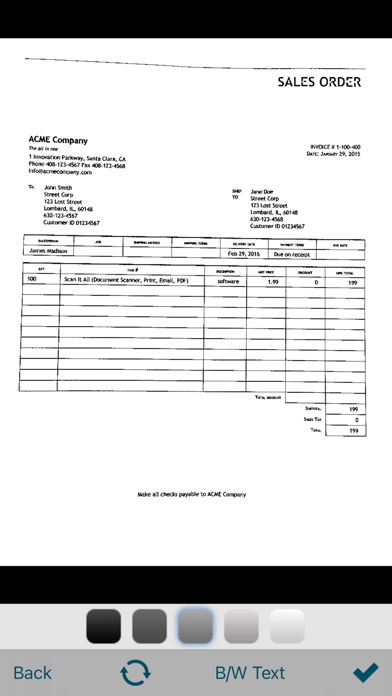
**Scan It All** auto-detects document edges, straightens the documents, eliminates shadows and sets a perfect contrast.
Very easy and intuitive interface.
All image processing happens on your iOS device, keeping your documents secure and confidential.
**Scan It All** has DropBox, Google Drive and OneDrive support, upload your PDF to cloud service from within the app.
FEATURES:
• On touch Email, Print and Upload options on scanned documents.
• Automatic perspective correction and edge detection, manual options to override it for Black & white and color.
• Sign document pages*.
• Quick processing.
• Multipage editing: reorder (drag drop), delete (drag out) and add multiple pages*
• Email document as PDF.
• Email PDF to pre-configured email addresses.
• Email JPEGs as attachment.*
• Printing via AirPrint.
• Compact attachments.
• Open PDF in other applications like (Dropbox, Evernote, iBooks etc)*
• Export scanned Images to Photo Library*
• Upload PDF to Dropbox, Google Drive and oneDrive directly*
• Copy Image.
• Paste Image*
• Export PDFs from other apps to Scan It All and add/edit pages.
• Set PDF Password.
• Import encrypted PDFs.
• Use Touch ID to secure documents.
• Backup/Restore*/Sync documents to/form iCloud
• Scan from Photo Gallery
• Merge Documents
* (requires one time upgrade to un-limited version)
TIPS ON SCANNING
• Make sure your document is flat and well lit.
• Use flash in low light conditions, but avoid glare with glossy documents (magazines, etc.)
We're constantly improving Scan It All, If you want to send us your feedback or have a problem with our software, please use the Email Support button in the app.
If you find an issue with our software please email support@bitsabound.com or use "Email Support" option under settings menu, and we'll promptly reply.