

Sidecar MIDI Controller
Sidecar MIDI Controller is made and published by Secret Base Design. AppBrain is an independent app data site and isn't affiliated with Secret Base Design. The app name, icon, screenshots and description belong to Secret Base Design and are shown as published on the App Store.
AppBrain's verdict
Established- Rating on App Store
- 4.86
- 14 ratings
- Last updated
- February 24, 2026
It doesn't have enough ratings yet to judge what users think.
Rankings
App Store top chartsApp Store Rankings for Sidecar MIDI Controller
Competitors
Similar apps and more from Secret Base DesignAlternatives to Sidecar MIDI Controller






More from Secret Base Design






Releases
Updates seen on the App Store- Version
- 1.9
- Launched
- January 2016
No changelog data
User feedback
Ratings and reviews on the App StoreComments on Sidecar MIDI Controller for iOS
We don't have enough comments to show example comments. Please check back later.
Technology
Found in the app by AppBrain- Price
- $4.99
- App size
- 6.24 MB
- Content rating
- Everyone
Technologies used by Sidecar MIDI Controller
About the app and developer
About Sidecar MIDI Controller
Sidecar MIDI Controller is a music app developed by Secret Base Design.
What is the rating of Sidecar MIDI Controller?
Sidecar MIDI Controller is rated 4.86 out of 5 stars, based on 14 ratings.
Is Sidecar MIDI Controller free?
Sidecar MIDI Controller costs $4.99. The app size is 6.24 MB. The latest version available is 1.9. The last update was on February 24, 2026.
What are the requirements for Sidecar MIDI Controller?
The app has a content rating of Everyone. The app has been available on the App Store since January 2016.
Developer information for Secret Base Design
Address:
Store listing
By Secret Base Design, from the App Store
Description by Secret Base Design Written by the developer, not by AppBrain. Click to read.
On screen, you have access to each of the pads -- map the knobs and sliders of your synth apps to MIDI CC messages, and then use Sidecar to adjust these sliders as you play.
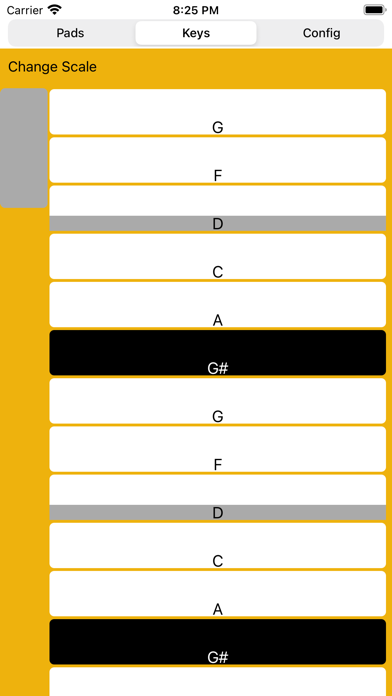
Sidecar also provides a scale-configurable virtual keyboard. Pick the scale you want, and then you can't hit a wrong note.
In addition to external keyboards, Sidecar also supports many game controllers. The app is now universal; while the iPhone doesn't support slide-over, you can still take advantage of the configuration options of the app.
* Easy MIDI Configuration
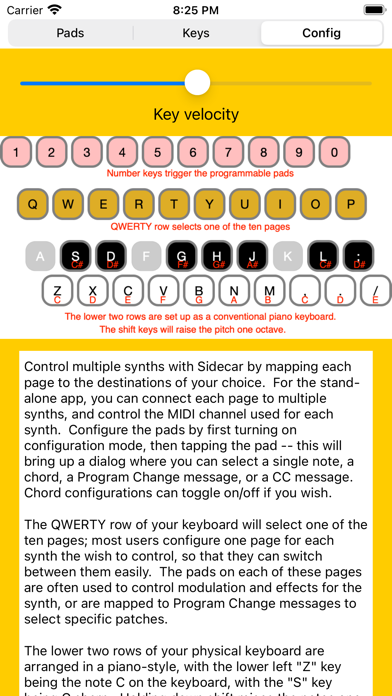
With ten separately configurable MIDI destinations you can quickly set up a set of assignments for each of the MIDI apps that you use. Have a set of chords for Animoog, choose different presets for ToneStack, or assign pads to different samples for DM1. Each MIDI destination has ten configurable pads, which can be assigned to chords, single notes, a program change message, or a controller change message. For notes and chords, the touch position controls note velocity. For controller change messages, the location of a touch on screen can be used to determine the controller value.
* QWERTY Keyboard Support
Toggle on support for the external keyboard, and you can switch between the ten MIDI destinations quickly (using the keys in the QWERTY row). Toggle on or off any of the ten pads by pressing the number keys. The two lowest rows of keys are mapped as a standard piano keyboard, providing a musical play surface with an ordinary text keyboard. Note that QWERTY keyboards only send "key press" information to your iPad -- to silence a sounding note, you simply tap the space bar.
* AUv3 Support
Add the plug-in to your favorite DAW or looper, and Sidecar will give you easy access to multiple synths. Many AUv3 hosts will also let you map the keyboard keys to the transport controls.
* Game Controller Ready
Sidecar also supports the iON iCade game controller, mapping the buttons of the iCade to the pads. Because the iCade was designed for games, it sends button press and release information, which makes it easy to toggle on and off the pads.
* MIDI Relay
If you have an external MIDI controller, you can have it send MIDI events to Sidecar -- and these will be relayed to any of the ten MIDI destinations you select. Use this to quickly switch from one synth to another.
*Control Background Synths
Because Sidecar sends MIDI messages, it can be used to control background synthesizers, sequencers, and effects apps.
Sidecar is designed to work along side your other iOS music apps.