
SpeakTimer is made and published by RamSystem. AppBrain is an independent app data site and isn't affiliated with RamSystem. The app name, icon, screenshots and description belong to RamSystem and are shown as published on the App Store.
AppBrain's verdict
- Last updated
- February 28, 2023
- Size
- 7.07 MB
User feedback
Ratings and reviews on the App StoreComments on SpeakTimer for iOS
We don't have enough comments to show example comments. Please check back later.
Store listing
By RamSystem, from the App Store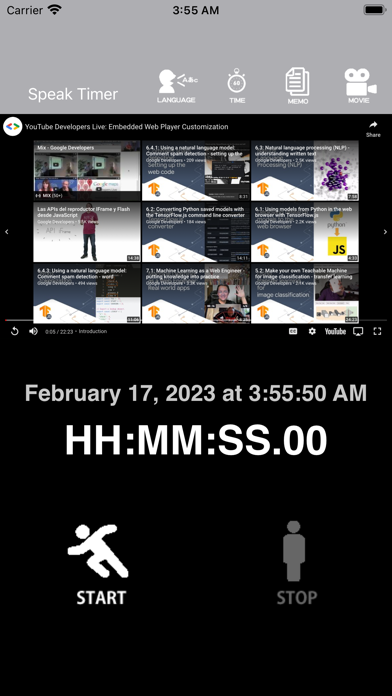

Description by RamSystem Written by the developer, not by AppBrain. Click to read.
It's a talking timer.
It is an application that tells the time elapsed from the start in various situations such as walking, running, cycling, etc. by voice.
It is a very convenient and unprecedented app that allows you to know the passage of time while watching and listening to your favorite videos.
A variety of languages are supported.
About 50 languages are supported.
After downloading the app from the App Store,
The first thing to do is set the language.
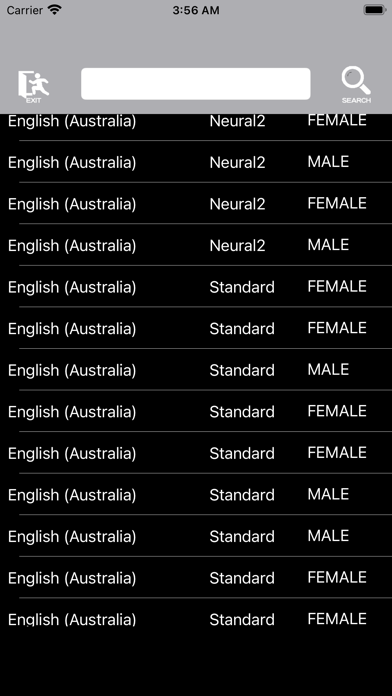
When you launch the app for the first time, the language setting screen will be displayed.
A list of languages from 50 countries around the world is displayed.
You can select while scrolling the screen, but you can also narrow down the display to only the language.
Tap the "Search" icon on the upper left.
Only the language is displayed in the list.
To return to the previous screen, tap the "Cancel" icon on the upper left.
When you select a language, you can select male, female, and voice quality for each language.
Neural -> Standard -> WaveNet will improve the quality,
There is no problem if it is possible to select as you like.
Confirm the voice to be used by tapping the "Save" icon on the upper right.
When you tap this "Save" icon, the app's initial setup will be processed.
Depending on the model you are using, you may have to wait for 1-2 minutes.
A confirmation dialog will be displayed, so please select "Yes".
When the initial settings are completed, the screen returns to the start screen.
Also, the opening video on YouTube will be played at this time.
The default setting for audio output is
It is set every 15 seconds and every 10 minutes.
To use timer processing, tap the "START" icon to start,
Tap the "STOP" icon to finish.
At this time, if a YouTube video is playing, audio is given priority.
The video is paused during this time.
About app functions
1.Regarding audio language settings
※Setting method
Tap the "LANGUAGE" icon
Transition to the language setting screen, which is the initial operation screen of the application.
You can also select a language from the displayed list,
You can also select the display language by tapping the "SEARCH" icon.
When you select the language, a demo voice will play, so
Choose your favorite language.
2. Setting the voice generation time
※Setting method
Tap the "TIME" icon.
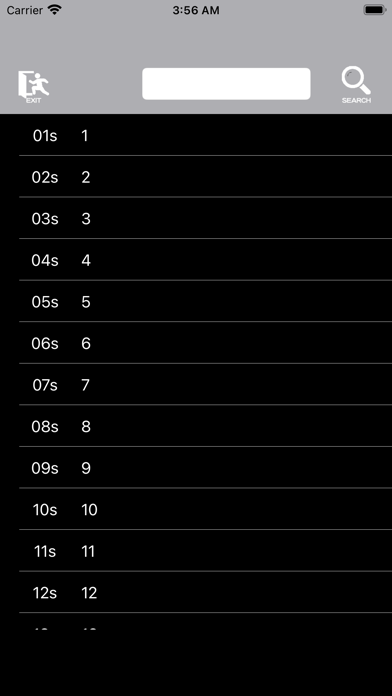
Moves to the screen for setting the sound generation time.
Please select the time displayed.
Seconds are displayed from 1 second to 59 seconds and can be selected.
The notation is from 01s to 59s.
The minute is displayed from 1 minute to 59 minutes and can be selected.
The notation is from 01m to 59m.
The hour is displayed from 1 hour to 23 hours and can be selected.
The notation is from 01h to 23h.
*Notes
If you set a long sound with short intervals, the set sound may disappear.
3. About timer usage history
The usage history of the timer is displayed.
4. How to display YouTube videos
※Method of operation
Tap the "MOVIE" icon.
Enter the VideoID part displayed in "Share" on YouTube.
https://youtu.be/*****
VideoID is the part indicated by *** in the upper line.
There are two input lines, the upper line is for inputting VideoID, and the lower line is for comment input.
It will be convenient later if you enter a brief description of the video in the comment field.
Enter VideoiD using alphanumeric characters. Please enter uppercase and lowercase letters correctly.
It is started with the "Play" button and paused with "STOP".
Also, the VideoID and comment entered by tapping the "Play" button are saved in the list.
Safety and technology
Found in the app by AppBrain- Price
- Free
- App size
- 7.07 MB
- Content rating
- Everyone
Technologies used by SpeakTimer
Releases
Updates seen on the App Store- Version
- 1.0.0
- Launched
- February 2023
No changelog data
Alternatives
Similar apps and more from RamSystemAlternatives to SpeakTimer







More from RamSystem








Rankings
App Store top chartsApp Store Rankings for SpeakTimer
About the app and developer
About SpeakTimer
SpeakTimer is an utilities app developed by RamSystem.
User Ratings
The app has no ratings yet.
App Information
SpeakTimer is freely available from the App Store. The app size is 7.07 MB. The latest version available is 1.0.0. The last update was on February 28, 2023.
Technical Requirements
The app has a content rating of Everyone. The app has been available on the App Store since February 2023.
Developer information for RamSystem
Address: