

TakeFlow: Video Teleprompter
TakeFlow: Video Teleprompter is made and published by Vladyslav Dmytriiev. AppBrain is an independent app data site and isn't affiliated with Vladyslav Dmytriiev. The app name, icon, screenshots and description belong to Vladyslav Dmytriiev and are shown as published on the App Store.
AppBrain's verdict
- Last updated
- September 22, 2026
Rankings
App Store top chartsApp Store Rankings for TakeFlow: Video Teleprompter
Competitors
Similar apps and more from Vladyslav DmytriievAlternatives to TakeFlow: Video Teleprompter


More from Vladyslav Dmytriiev


Releases
Updates seen on the App Store- Version
- 1.0
- Launched
- September 2026
No changelog data
User feedback
Ratings and reviews on the App StoreComments on TakeFlow: Video Teleprompter for iOS
We don't have enough comments to show example comments. Please check back later.
Technology
Found in the app by AppBrain- Price
- Free
- App size
- 14.5 MB
- Content rating
- Everyone
Technologies used by TakeFlow: Video Teleprompter
About the app and developer
About TakeFlow: Video Teleprompter
TakeFlow: Video Teleprompter is a photo & video app developed by Vladyslav Dmytriiev.
User Ratings
The app has no ratings yet.
App Information
TakeFlow: Video Teleprompter is freely available from the App Store. The app size is 14.47 MB. The latest version available is 1.0. The last update was on September 22, 2026.
Technical Requirements
The app has a content rating of Everyone. The app has been available on the App Store since September 2026.
Developer information for Vladyslav Dmytriiev
Address:
Frequently asked questions about TakeFlow: Video Teleprompter
Is TakeFlow: Video Teleprompter free?
Yes. TakeFlow: Video Teleprompter is free on the App Store.
Is TakeFlow: Video Teleprompter still available?
Yes. TakeFlow: Video Teleprompter is on the App Store, and the last update we saw was on September 22, 2026.
How large is TakeFlow: Video Teleprompter?
TakeFlow: Video Teleprompter is 14.47 MB.
Is TakeFlow: Video Teleprompter suitable for children?
App Store rates the content of TakeFlow: Video Teleprompter as suitable for everyone.
Who made TakeFlow: Video Teleprompter?
TakeFlow: Video Teleprompter was developed by Vladyslav Dmytriiev. It is listed in the photo & video category on the App Store.
What are the best alternatives to TakeFlow: Video Teleprompter?
People looking at TakeFlow: Video Teleprompter also look at these photo & video apps: Agave Teleprompter, Video Teleprompter Lite, FilmCam - Vintage Photo, SpeakCam - Voice Teleprompter, Prompter Cam: Script Camera.
Store listing
By Vladyslav Dmytriiev, from the App Store


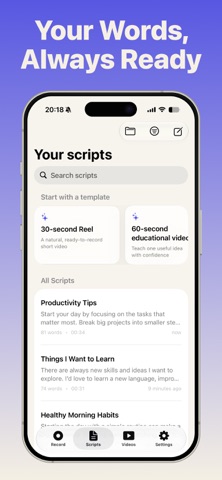


Description by Vladyslav Dmytriiev Written by the developer, not by AppBrain. Click to read.
Read your script while recording and keep your eyes close to the camera. TakeFlow helps you speak with confidence, reduce retakes, and create videos that feel natural from the very first take.
WRITE, READ, AND RECORD
• Write or paste scripts directly in TakeFlow
• Read your words while recording video
• Adjust scrolling speed to match your speaking pace
• Customize text size, spacing, alignment, and opacity
• Use mirror mode with teleprompter rigs
• Record with the front or rear camera
• Review and trim your takes
• Export videos to Photos and share them
ORGANIZE YOUR CONTENT
Keep scripts and recordings organized by project, platform, client, or class. Create folders for different types of content and keep every take ready when you need it.
USE TAKEFLOW FOR
Vlogs, short-form social videos, tutorials, online courses, presentations, interviews, product demos, business videos, talking-head content, and everyday video creation.
TAKEFLOW PRO
TakeFlow includes a free plan so you can try the core recording workflow. Upgrade to TakeFlow Pro to unlock:
• Unlimited scripts
• Unlimited stored takes
• Unlimited recording time
• Unlimited video exports
• Script and video folders
• Advanced teleprompter text controls
• 1080p and 4K recording
• More control over every take
Your scripts and recordings stay on your device in this build. TakeFlow does not upload your recordings.
Set up your script, press record, and let your words flow.
Privacy Policy
https://aqeno.com/privacy-takeflow
Terms of Use (EULA)
https://www.apple.com/legal/internet-services/itunes/dev/stdeula/