

UXDesignFlow
UXDesignFlow is made and published by Enrico Ferro. AppBrain is an independent app data site and isn't affiliated with Enrico Ferro. The app name, icon, screenshots and description belong to Enrico Ferro and are shown as published on the App Store.
AppBrain's verdict
- Last updated
- April 25, 2024
Rankings
App Store top chartsApp Store Rankings for UXDesignFlow
Competitors
Similar apps and more from Enrico FerroAlternatives to UXDesignFlow






More from Enrico Ferro






Releases
Updates seen on the App Store- Version
- 1.1
- Launched
- April 2024
No changelog data
User feedback
Ratings and reviews on the App StoreComments on UXDesignFlow for iOS
We don't have enough comments to show example comments. Please check back later.
Technology
Found in the app by AppBrain- Price
- $0.49
- App size
- 7.01 MB
- Content rating
- Everyone
Technologies used by UXDesignFlow
About the app and developer
About UXDesignFlow
UXDesignFlow is a productivity app developed by Enrico Ferro.
What is the rating of UXDesignFlow?
UXDesignFlow has no ratings yet.
Is UXDesignFlow free?
UXDesignFlow costs $0.49. The app size is 7.01 MB. The latest version available is 1.1. The last update was on April 25, 2024.
What are the requirements for UXDesignFlow?
The app has a content rating of Everyone. The app has been available on the App Store since April 2024.
Developer information for Enrico Ferro
Address:
Frequently asked questions about UXDesignFlow
Is UXDesignFlow free?
No. UXDesignFlow costs $0.49 on the App Store.
Is UXDesignFlow still available?
Yes. UXDesignFlow is on the App Store, and the last update we saw was on April 25, 2024.
How large is UXDesignFlow?
UXDesignFlow is 7.01 MB.
Is UXDesignFlow suitable for children?
App Store rates the content of UXDesignFlow as suitable for everyone.
Who made UXDesignFlow?
UXDesignFlow was developed by Enrico Ferro. It is listed in the productivity category on the App Store.
What are the best alternatives to UXDesignFlow?
People looking at UXDesignFlow also look at these productivity apps: AR Models Manager, Wall Portfolio for Artist, FingerGIS, Space Dial: Optimize Your Time, Strflow: Text Yourself Notes.
Store listing
By Enrico Ferro, from the App Store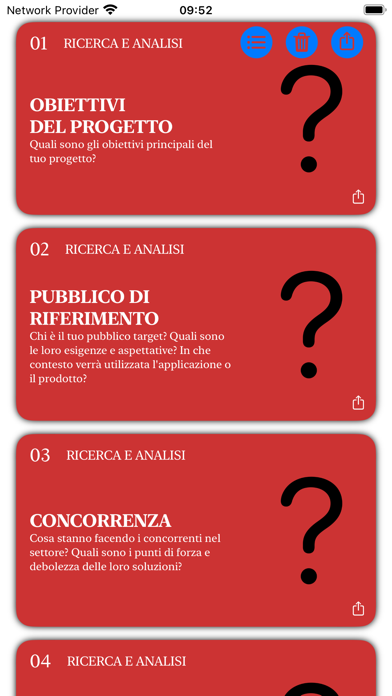

Description by Enrico Ferro Written by the developer, not by AppBrain. Click to read.
With UXDesignFlow, you'll have access to a wide range of thematic cards, each designed to illuminate a crucial aspect of mobile app development. From initial research and analysis, through ideation and visual design, to prototyping, testing, and iteration, our cards cover it all. Each card is a concentration of guiding questions, practical tips, and reflection prompts designed to stimulate creativity, promote user-friendly solutions, and encourage effective teamwork.
Key Features:
- Comprehensive Coverage: Explore cards that address every aspect of app development, from ideation to launch and beyond.
- User Focus: Learn to understand your audience and test your ideas with real users to ensure your app meets their needs.
- Collaboration and Communication: Use our cards to facilitate collaboration among designers, developers, and stakeholders, ensuring everyone is aligned with the project's goals.
Complementary Resources:
For an even richer and integrated experience, discover "Beyond the Code: Strategies, Techniques, Best Practices, and Guided Path for Developing Successful Apps" on Apple Books, the complementary manual that accompanies the app, offering detailed guidance and valuable insights to make the most of every feature offered by UXDesignFlow. Although the app and manual are standalone resources, together they form an inseparable duo for those wishing to navigate successfully in the world of app development.
Whether you want to refine your development strategy, solve a specific problem, or simply seek inspiration, UXDesignFlow is the tool for you. Transform your ideas into exceptional apps that capture attention and win over users' hearts.
MAIN SOFTWARE FEATURES:
1. **Dynamic Deck View**: The app allows you to navigate through a deck of interactive thematic cards, each dedicated to a different aspect of app development, in a smooth and intuitive manner.
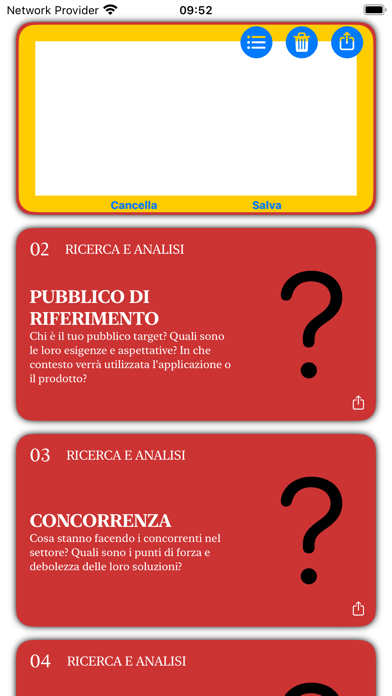
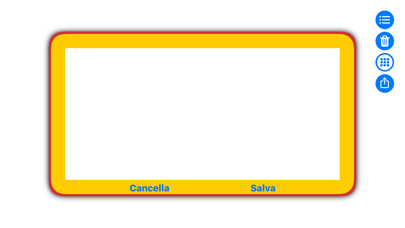
2. **Custom Annotations for Each Card**: Users can annotate each card with personal reflections, ideas, or notes, enriching the original content with their own input and turning the card into a starting point for further exploration.
3. **Integrated Export and Sharing**: Export functionality that allows users to share the content of the cards, including their own annotations, through the iOS sharing panel, facilitating collaboration and discussion on external platforms.
4. **Synchronization via iCloud and CloudKit**: Support for iCloud and CloudKit that allows users to access their cards and annotations from any associated device, ensuring seamless continuity in work and reflections.
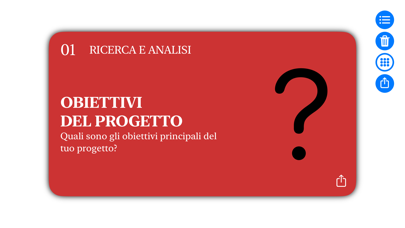
5. **Optimization for Various Devices and Orientations**: The app is designed to adapt to different screen sizes and device orientations, offering an optimal user experience on both iPhone and iPad.
6. **Flexible Card Display**: Ability to view a single card for in-depth reflection or multiple cards simultaneously, for an overview or to compare different aspects.
Download UXDesignFlow today and start your journey towards successful app development!