Download Android Apps and Games
AppBrain
  • Apps
  • Apps being viewed right now Trending apps today Most popular apps All-time most downloaded apps Top rated apps
  • Intelligence ▾
    Intelligence overview → Track any Android app or your whole market
    Track & analyze
    Keyword Tracker & OptimizerTrack & improve Play rankings App Performance ReportOne-off PDF for any app StatisticsFree Android & Play market stats
    Promote your app
    Featured Apps App Links
  • Intelligence
  • Pricing
  • Dashboard
  • Sign up
  • Log in
Last updated on: 2026-06-09
App Store Apps > Productivity > FingerGIS
FingerGIS icon

FingerGIS

1.5.1
Gianluca Natalini
4.00
1 reviews
$2.99

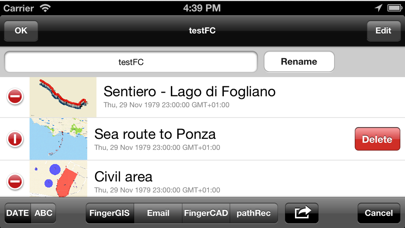
FingerGIS Screenshot 1 of 5
FingerGIS Screenshot 2 of 5
FingerGIS Screenshot 3 of 5
FingerGIS Screenshot 4 of 5
FingerGIS Screenshot 5 of 5
Download from the App Store

About FingerGIS

FingerGIS is an overall app developed by Gianluca Natalini.

Download Statistics

User Ratings

FingerGIS is rated 4.00 out of 5 stars. The rating is based on one rating ratings.

App Information

FingerGIS costs $2.99 to download. The APK download size is 7.13 MB. The latest version available is 1.5.1. The last update was on April 24, 2023.

Technical Requirements

The app has a content rating of Everyone. The app has been available on Google Play June 2013.

Description
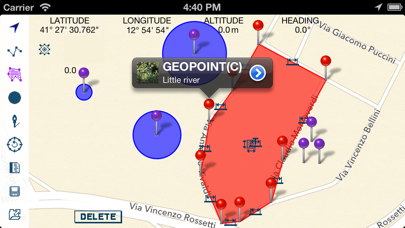
"FingerGIS" is the first GIS application (Geographical Information System) for iPad, iPhone, iTouch.
With "FingerGIS" You can draw (georeferencing):
- 2D shapes such as sites, lands, roads or paths explorable by car, plane or on foot (in the city, in the countryside, on a hill, in the mountains, at sea, etc...)
- 3D shapes such as multiple surfaces in space, air routes, etc...
The generic 2D and 3D shapes can be drawn over the maps (2D and 3D) of the globe, visualized by "FingerGIS" on the screen (Google Maps or Apple Maps), like when You draw using a CAD application.
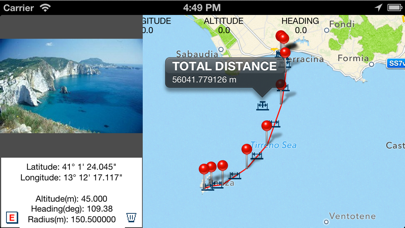
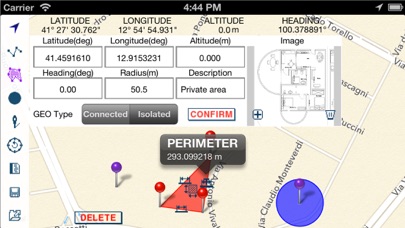
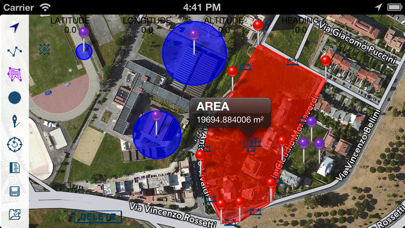
You can query the maps and the geographical points (manually inserted or automatically recorded) in order to obtain lengths, distances between geographic points, measure of areas and perimeters, total length of a path (polyline), etc...
"FingerGIS" provides several automatic recording mode and/or manual input windows to insert the geographical points of interest; You will be able to:
- save the current positions as a new geopoint, during the exploration of a site (using the GPS to get your current location and pressing the "save current location" button to save your current position as a new geopoint)
- enter manually new geographical points using the manual input window (with latitude, longitude, altitude, heading (it uses the device's internal compass), radius, description: these geopoint's data (such as latitude, longitude, altitude, heading, etc…) can be entered automatically by touching with a finger the desired position in the displayed maps (by touching the screen of the device) or manually typing the numerical values ​​/ text using the keyboard of the device)
- save images together with geographic points (You can insert images taken with the camera in real time or stored in the photo album of the device and join the images with the geopoints)
- save an infinite number of isolated geographical points and / or circular areas of known radius, etc...
- automatically record sites, activating the "automatic recording" function and walking on the perimeter of the site to be recorded
- draw each type of 2D and 3D objects over the maps of the globe, using multiple layers, as You would normally do with common CAD / GIS / SIT for personal computers.
All geographic points inserted over the maps, with their descriptions, measurements and images can be saved in the archive of documents of "FingerGIS" and may be shared with other applications installed on Your device or with cloud systems such as Dropbox.
"FingerGIS" is able to export the saved geographical points using:
- .csv file format (native "FingerGIS" file format)
- in the native file format of "FingerCAD" (You can draw your CAD projects over geographic maps or over the geo-referenced sites recorded by "FingerGIS")
- in the native file format of "pathRecorder" (navigation system with automated indications to reach destinations, following paths recorded or drawn)
- as an email attachment (.zip compressed file, containing all the recorded geopoints, the informations, data, images, etc...)

With "FingerGIS" You will have a complete GIS application in your mobile device.

Sharing documents (IN/OUT) with:
- DROPBOX (remote storage systems, cloud)
- Open In
- iTunes File Sharing
- email attachment
- FingerCAD (HD , WS , PRO) (using "Open In" - 3D data export/sharing)
- pathRecorder - come back (using "Open In")

Using FingerCAD together with FingerGIS:
You can export the recorded sites using a .DXF file format (compatible with the CAD applications for MAC or PC) or a .OBJ file format (compatible with the 3D modeling applications for MAC or PC) or .PDF file format.

Documents archive:
- an infinite number of documents can be saved in the FingerGIS documents archive

Display:
- Retina display supported

App type:
- UNIVERSAL APP (You pay the app only once and it runs on all the devices)
Show more Show less

More data about FingerGIS

Price $2.99
Rating 4.00 based on a single rating
Ranking Not ranked
Version 1.5.1
App download size 7.13 MB
Suitable for Everyone

Alternative downloads for the FingerGIS app

Progress Counter icon Progress Counter
Brandon Wallace
0.0
$0.99
SMASH Digital Field Mapping icon SMASH Digital Field Mapping
HydroloGIS S.r.l.
5.0
Free
1 ratings
Trucker Ally icon Trucker Ally
Floms, Inc.
4.2
Free
5 ratings
Smartphone - T9 Dialer icon Smartphone - T9 Dialer
Henrik Top Mygind
0.0
Free
GIS Lite icon GIS Lite
Ioannis Sofos
0.0
Free
WAGO WebVisu icon WAGO WebVisu
WAGO Kontakttechnik GmbH & Co. KG
3.0
Free
2 ratings
Jurybox - Jury Selection icon Jurybox - Jury Selection
Jurybox Technologies, LLC
5.0
Free
3 ratings
ColdTempCorr icon ColdTempCorr
AeroKitPro LLC
0.0
Free

More from Gianluca Natalini
Basal Body Temperature Calc. icon Basal Body Temperature Calc.
Gianluca Natalini
1.3
$0.99
18 ratings
iTuningFork - Tone Generator icon iTuningFork - Tone Generator
Gianluca Natalini
1.6
$1.99
5 ratings
midi Sampler icon midi Sampler
Gianluca Natalini
2.6
$1.99
5 ratings
djTurntables icon djTurntables
Gianluca Natalini
1.4
$0.99
5 ratings
FingerCAD icon FingerCAD
Gianluca Natalini
1.0
$2.99
4 ratings
ArcadeBox icon ArcadeBox
Gianluca Natalini
4.5
$0.99
4 ratings
ME MIDI Sampler icon ME MIDI Sampler
Gianluca Natalini
2.0
$1.99
4 ratings
iWord PRO icon iWord PRO
Gianluca Natalini
2.8
$1.99
4 ratings

Changelog of FingerGIS

No changelog data

Developer information for Gianluca Natalini

Gianluca Natalini

Address:

Share FingerGIS

Comments on FingerGIS for iOS

We don't have enough comments to show example comments. Please check back later.

App Store Rankings for FingerGIS

This app is not ranked

Technologies used by FingerGIS

Progress Counter icon Progress Counter
SMASH Digital Field Mapping icon SMASH Digital Field Mapping
Trucker Ally icon Trucker Ally
Smartphone - T9 Dialer icon Smartphone - T9 Dialer
GIS Lite icon GIS Lite
WAGO WebVisu icon WAGO WebVisu
Jurybox - Jury Selection icon Jurybox - Jury Selection
ColdTempCorr icon ColdTempCorr

Back to top
AppBrain Intelligence premium content

Subscribe now to get full and unlimited access to AppBrain Intelligence. You'll have access to:

  • App Intelligence dashboard (performance timeline, competitor comparison, country rankings, insight cards)
  • Detailed ranking data per app
  • Full timeline per developer
  • Device market shares data per country
1 Month

$75/mo
(billed every month)

SAVE 0%
Subscribe
3 Months

$65/mo
($195 billed every 3 months)

SAVE 13%
Subscribe
1 Year

$57.50/mo
($690 billed every year)

SAVE 23%
Subscribe
Each subscription will automatically renew 3 days before the expiration date for the same time period. Subscriptions can be cancelled at any time before the renewal.

AppBrain is a directory focused on discovering great apps and games. We give statistics, rankings and search options that Google Play and the App Store don't have. All trademarks are owned by their respective owners. AppBrain doesn't offer APKs or binaries, and always lets users install the official version from Google Play or the App Store.

More apps

  • Top Android apps being viewed
  • CricX Live
  • US Ship Games Warship Battle
  • View Church on the Rock

Android Statistics

  • Android statistics
  • Google Play Developer stats
  • Trending Android Apps
  • Top popular Apps
  • Buy the best Android phone

About AppBrain

  • Contact
  • Privacy
  • Documentation
  • DMCA takedowns
  • Articles
  • Blog
  • Monetization tips: Understanding your eCPM
© 2010-2026 - AppBrain