




AppBrain's verdict
Established- Rating on App Store
- 5.00
- 1 ratings
- Last updated
- May 28, 2024
- Size
- 13.5 MB
It doesn't have enough ratings yet to judge what users think.
User feedback
Ratings and reviews on the App StoreComments on Canon Publisher Mobile for iOS
We don't have enough comments to show example comments. Please check back later.
Store listing
By Canon Production Printing Netherlands B.V., from the App StoreDescription by Canon Production Printing Netherlands B.V. Written by the developer, not by AppBrain. Click to read.
Printing with Publisher Mobile is easy:
CONFIGURE Publisher Mobile
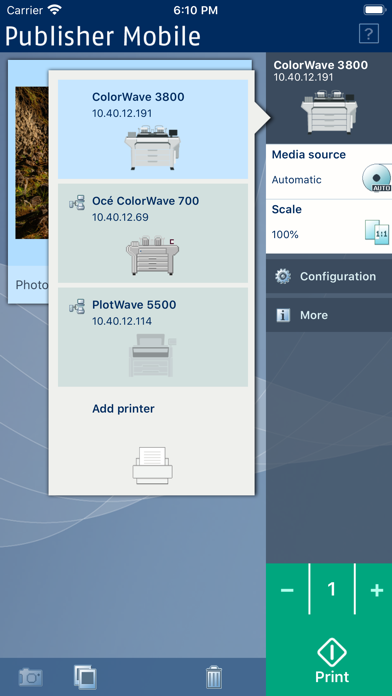
Tap the printer button > Publisher Mobile detects the compatible printers that are available in your network. The detected printer (indicated with a 'Connection' icon) is added to your printers list.
When your printer is not detected, you can add it manually: tap the 'Add' printer button.
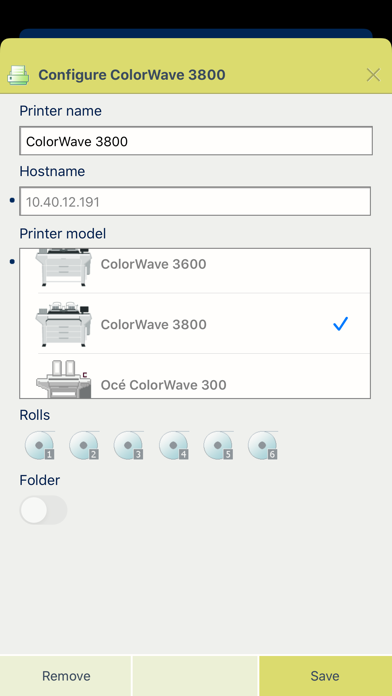
Enter the IP address or hostname of the printer > Give it a name > Check or define the printer model > Define the number of rolls > Indicate if there is a folder > Add / Save > Ready!
OPEN A DOCUMENT
From your e-mail, web browser or any other App: Select a document and use the "Open in" functionality > Select Publisher Mobile.
Or From Publisher Mobile: Tap the “Photos” icon > Browse your Photo Gallery to select a document; or Tap the “Camera” icon > Take a picture.
PRINT A DOCUMENT
Select a printer > Define the print settings you need > Tap the Green button > You print!
DELETE A DOCUMENT
Select a document > Tap the "Delete" icon > Confirm
ADDITIONAL INFO
1. Publisher Mobile operates with all the TDS, TCS, PlotWave and ColorWave printers.
2. Publisher Mobile displays a preview of your PDF, JPG and TIFF documents. To preview a DWF file, you must use a dedicated App.
3.Plotting PDF and DWF depends on system configuration.
4.PLT files in HPGL1/2
5.Find out more on the Publisher Mobile Support page
Safety and technology
Found in the app by AppBrain- Price
- Free
- App size
- 13.5 MB
- Content rating
- High
Technologies used by Canon Publisher Mobile
Releases
Updates seen on the App Store- Version
- 2.10
- Launched
- December 2011
No changelog data
Alternatives
Similar apps and more from Canon Production Printing Netherlands B.V.Alternatives to Canon Publisher Mobile






Rankings
App Store top chartsApp Store Rankings for Canon Publisher Mobile
About the app and developer
About Canon Publisher Mobile
Canon Publisher Mobile is a productivity app developed by Canon Production Printing Netherlands B.V.
User Ratings
Canon Publisher Mobile is rated 5.00 out of 5 stars. The rating is based on one rating ratings.
App Information
Canon Publisher Mobile is freely available from the App Store. The app size is 13.54 MB. The latest version available is 2.10. The last update was on May 28, 2024.
Technical Requirements
The app has a content rating of High Maturity. The app has been available on the App Store since December 2011.
Canon Publisher Mobile is made and published by Canon Production Printing Netherlands B.V. AppBrain is an independent app data site and isn't affiliated with Canon Production Printing Netherlands B.V. The app name, icon, screenshots and description belong to Canon Production Printing Netherlands B.V. and are shown as published on the App Store.