AppBrain
AppBrain
  • Apps
  • Apps being viewed right now Trending apps today Most popular apps All-time most installed apps Top rated apps iPhone and iPad apps
  • Intelligence ▾
    Intelligence overview → Track any Android app or your whole market
    Track & analyze
    Keyword Tracker & OptimizerTrack & improve Play rankings App Performance ReportOne-off PDF for any app StatisticsFree Android & Play market stats
    Promote your app
    Featured Apps App Links
  • Intelligence
  • Pricing
  • Dashboard
  • Sign up
  • Log in
App Store Apps > Productivity > Password Guard
Password Guard icon

Password Guard

2.0.1
Alexandr Lobanov
0.00
0 reviews
Free

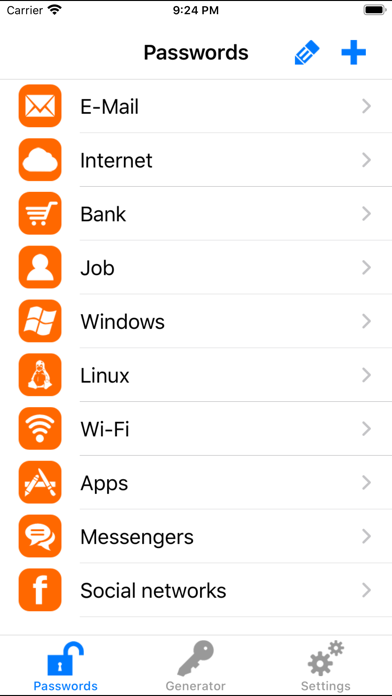
Password Guard Screenshot 1 of 5
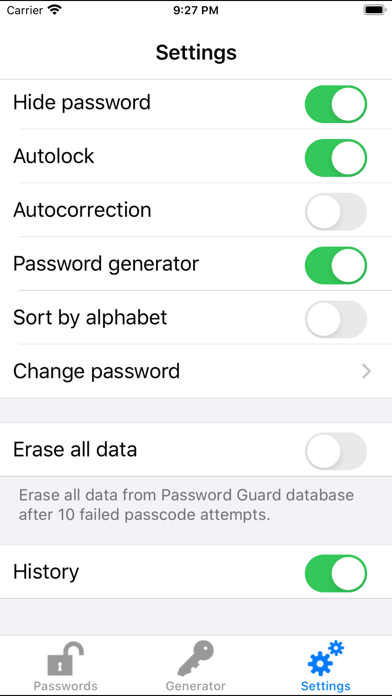
Password Guard Screenshot 2 of 5
Password Guard Screenshot 3 of 5
Password Guard Screenshot 4 of 5
Password Guard Screenshot 5 of 5
Screenshots by Alexandr Lobanov, from the the App Store listing
View on the App Store

AppBrain's verdict

Last updated
December 10, 2020
Size
23.2 MB
Official page on the App Store

User feedback

Ratings and reviews on the App Store

Comments on Password Guard for iOS

We don't have enough comments to show example comments. Please check back later.

Store listing

By Alexandr Lobanov, from the App Store
Description by Alexandr Lobanov Written by the developer, not by AppBrain. Click to read.
These days users have so many passwords that it’s absolutely impossible to remember all of them. From Facebook and Twitter to shopping sites, Web-based mail to online banking, sites demand a username and password. To memorize passwords for all this, you can use Password Guard. Secured by a single master password, this application provides an encrypted vault for storing passwords. All it takes is to open the app, go to the Passwords tab and view the required credentials, such as name of the site, username, password and URL-address.

Some people make poor choices when choosing passwords. They either choose a combination like 123 that can easily be hacked or use the same password for all accounts, which is dangerous because all accounts can be compromised if the hacker gets this password. Password Guard has a built-in password generator that can help you generate a strong, unique password for every website and service you log to. You can choose custom setting for a new password, including the desired number of letters, capitals, digits and symbols.

There are also some other handy features such as database backup using iTunes File Sharing or Dropbox, text encrypter/decrypter and automatic removal of data from the database after 10 failed passcode attempts.

Having something like Password Guard is very convenient. The user always has the iPhone at hand and can access any account simply by looking up the password in Password Guard.

It's highly recommended to use a strong password using capital letters, numbers, and special symbols.

Features:
- Strongest encryption algoritms;
- Builtin password generator;
- Theft protection. Remove all data after 10 wrong passwords input;
- Passwords history;
- Easy sorting;
- Notes.

What about security? Password Guard uses only strong and powerful encryption algorithms like a AES-256, PBKDF2 and SHA256.

Safety and technology

Found in the app by AppBrain
Price
Free
App size
23.2 MB
Content rating
Everyone

Technologies used by Password Guard

Releases

Updates seen on the App Store
Version
2.0.1
Launched
June 2012

No changelog data

Alternatives

Similar apps and more from Alexandr Lobanov

Alternatives to Password Guard

ReadySignOn icon ReadySignOn
ReadySignOn.com
5.0
$5.99
3 ratings
My Passwords Keyboard icon My Passwords Keyboard
Kobi Snir
4.0
Free
9 ratings
#1 Password Manager icon #1 Password Manager
CompaNova LLC
4.4
Free
5 ratings
FlowCrypt: Encrypted Email icon FlowCrypt: Encrypted Email
FlowCrypt a. s.
3.2
Free
4 ratings
Password Manager iPassSafe icon Password Manager iPassSafe
Netanel Software
4.3
Free
806 ratings
Photo Calc - Simple Calculator icon Photo Calc - Simple Calculator
kazuhiko sugimoto
3.6
Free
9 ratings
Search by Image for Safari icon Search by Image for Safari
Armin Sebastian
1.0
$6.99
1 ratings
Passwords Cloud icon Passwords Cloud
Dmytro Vynokurov
4.7
Free
989 ratings

More from Alexandr Lobanov

Orbital Invaders:Space shooter icon Orbital Invaders:Space shooter
Alexandr Lobanov
4.7
$0.99
38 ratings
ZIP,RAR File manager & Scanner icon ZIP,RAR File manager & Scanner
Alexandr Lobanov
3.0
Free
4 ratings
Czech-Russian dictionary icon Czech-Russian dictionary
Alexandr Lobanov
3.3
$0.99
3 ratings
Big English-Russian dictionary icon Big English-Russian dictionary
Alexandr Lobanov
3.0
$0.99
1 ratings
German-Russian dictionary DERU icon German-Russian dictionary DERU
Alexandr Lobanov
3.0
$0.99
1 ratings
Coloring Book. Paint & Draw icon Coloring Book. Paint & Draw
Alexandr Lobanov
0.0
$0.99
Money+ Expense Tracker icon Money+ Expense Tracker
Alexandr Lobanov
0.0
Free
Hidden Objects. Chaos Room icon Hidden Objects. Chaos Room
Alexandr Lobanov
0.0
$0.99

Rankings

App Store top charts

App Store Rankings for Password Guard

This app is not ranked

About the app and developer

About Password Guard

Password Guard is a productivity app developed by Alexandr Lobanov.

What is the rating of Password Guard?

Password Guard has no ratings yet.

Is Password Guard free?

Password Guard is free. The app size is 23.21 MB. The latest version available is 2.0.1. The last update was on December 10, 2020.

What are the requirements for Password Guard?

The app has a content rating of Everyone. The app has been available on the App Store since June 2012.

Password Guard is made and published by Alexandr Lobanov. AppBrain is an independent app data site and isn't affiliated with Alexandr Lobanov. The app name, icon, screenshots and description belong to Alexandr Lobanov and are shown as published on the App Store.

Developer information for Alexandr Lobanov

Alexandr Lobanov

Address:

Share Password Guard

Today's trending apps Price drops on Google Play Apps other people are watching Popular Productivity Apps Top new apps
ReadySignOn icon ReadySignOn
My Passwords Keyboard icon My Passwords Keyboard
#1 Password Manager icon #1 Password Manager
FlowCrypt: Encrypted Email icon FlowCrypt: Encrypted Email
Password Manager iPassSafe icon Password Manager iPassSafe
Photo Calc - Simple Calculator icon Photo Calc - Simple Calculator
Search by Image for Safari icon Search by Image for Safari
Passwords Cloud icon Passwords Cloud
Overview Alternatives Reviews Rankings Technology
AppBrain Intelligence premium content

Subscribe now to get full and unlimited access to AppBrain Intelligence. You'll have access to:

  • App Intelligence dashboard (performance timeline, competitor comparison, country rankings, insight cards)
  • Detailed ranking data per app
  • Full timeline per developer
  • Device market shares data per country
  • Unlimited keyword tracking
  • AI assistant access via MCP (Claude, Cursor or any MCP client)
1 Month

$75/mo
(billed every month)

SAVE 0%
Subscribe
3 Months

$65/mo
($195 billed every 3 months)

SAVE 13%
Subscribe
1 Year

$57.50/mo
($690 billed every year)

SAVE 23%
Subscribe
Each subscription will automatically renew 3 days before the expiration date for the same time period. Subscriptions can be cancelled at any time before the renewal.

AppBrain is an app data site, we track rankings, ratings, installs for all apps and games on Google Play and the App Store. AppBrain doesn't host app files or APKs, all install links go directly to the official store. All trademarks are owned by their respective owners.

More apps

  • Top Android apps being viewed
  • Idle Adventure for Android
  • View KMK Optometry Pages
  • Slots Creature 777 Android App

App statistics

  • Android statistics
  • Google Play Developer stats
  • Trending Android Apps
  • Trending iOS apps
  • Top popular Apps
  • Buy the best Android phone
  • Buy & sell app businesses

About AppBrain

  • Contact
  • Privacy
  • Documentation
  • DMCA takedowns
  • Blog
  • Free online games ยท play instantly
© 2010-2026 - AppBrain