

PDF Highlighter - Read & Edit
PDF Highlighter - Read & Edit is made and published by Jaydeep Dhameliya. AppBrain is an independent app data site and isn't affiliated with Jaydeep Dhameliya. The app name, icon, screenshots and description belong to Jaydeep Dhameliya and are shown as published on the App Store.
AppBrain's verdict
Established- Rating on App Store
- 3.00
- 1 ratings
- Last updated
- July 6, 2026
- Size
- 32.5 MB
It doesn't have enough ratings yet to judge what users think.
User feedback
Ratings and reviews on the App StoreComments on PDF Highlighter - Read & Edit for iOS
We don't have enough comments to show example comments. Please check back later.
Store listing
By Jaydeep Dhameliya, from the App Store




Description by Jaydeep Dhameliya Written by the developer, not by AppBrain. Click to read.
Easy to read & convert all image formats into PDF files with password security.
The complete PDF toolkit for reading, editing, scanning, converting, and managing documents on your iPhone and iPad.
Whether you're reviewing contracts, studying notes, filling forms, highlighting important sections, or creating PDFs from photos, PDF Highlighter - Read & Edit gives you everything you need in one powerful and easy-to-use app.
Designed for students, professionals, teachers, business users, and anyone who works with documents every day.
Now here you can edit PDF files and highlight the important and hide confidential text in PDF files easily. This will help you for protecting your privacy and ensuring confidential information stays hidden.
Whether you need to redact personal details from a PDF files or colorise important information in PDF files.
** Key Features
- Powerful PDF Editor
• Edit and annotate existing PDF documents
• Add images to PDF pages or scan to generate PDF files
• Save changes as a new copy or replace the original file
• Create professional documents on the go
- Advanced PDF Highlighter & Annotation Tools
• Highlight important text with multiple colors
• Add notes and comments
• Draw directly on PDF pages
• Add custom text anywhere in the document
• Insert signatures and initials
• Undo and redo changes instantly
- Smart PDF Reader
• Open and read PDF files quickly
• Smooth scrolling and fast page navigation
• Search text inside PDFs
• Jump directly to any page
• Zoom in and out with ease
• Recent files for quick access
• Open PDF files from other apps
• List and Grid view modes
• Organize files by folders
- Professional Markup Tools
• Pen and freehand drawing tools
• Multiple pen styles and colors
• Adjustable font styles and sizes
• Arrow tool
• Line tool
• Circle and filled circle tools
• Shape drawing support
• Precision editing with zoom controls
• Blur or hide important text information
- Scan to PDF
• Scan documents using your camera
• Create high-quality PDFs from images
• Automatic document detection
• Save scans in portrait or landscape mode
• Perfect for receipts, notes, contracts, invoices, and forms
- Image to PDF Converter
• Convert photos into PDF documents
• Combine multiple images into a single PDF
• Rearrange pages before creating PDF
• Create professional PDF files in seconds
- PDF Conversion Tools
• PDF to Word
• Word to PDF
• Image to PDF
• Scan to PDF
• PDF to ZIP
• Fast and reliable document conversion
- PDF Management Tools
• Merge multiple PDF files
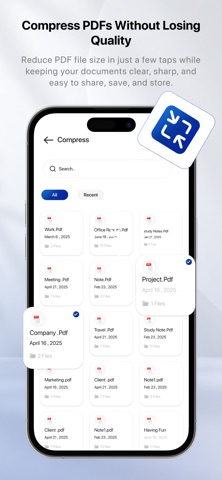
• Compress PDF files to reduce size
• Batch compress multiple PDFs
• Organize and manage documents easily
• Rename, move, and share files
- Privacy & Security
• Lock PDF files with passwords
• Protect sensitive documents
• Secure file management
• Keep your important files private
- Save & Share Anywhere
• Export and share PDFs instantly
• Share files via email, messaging apps, and more
• Print PDF documents directly from your device
- Why Choose PDF Highlighter - Read & Edit?
• Fast and lightweight
• Professional PDF editing tools
• Powerful highlighter and annotation features
• Complete document management solution
• Easy-to-use interface
• Perfect for work, study, business, and personal use
Download now and take full control of your PDF documents anytime, anywhere.
Privacy Policy:
https://shadowphotovideoeditorzoneappspolicy.blogspot.com/2024/02/shadow-photo-video-editor-zone-privacy.html
Terms of Use (EULA):
https://www.apple.com/legal/internet-services/itunes/dev/stdeula/
Safety and technology
Found in the app by AppBrain- Price
- Free
- App size
- 32.5 MB
- Content rating
- Everyone
Technologies used by PDF Highlighter - Read & Edit
Releases
Updates seen on the App Store- Version
- 1.2
- Launched
- September 2018
No changelog data
Alternatives
Similar apps and more from Jaydeep DhameliyaAlternatives to PDF Highlighter - Read & Edit





More from Jaydeep Dhameliya






Rankings
App Store top chartsApp Store Rankings for PDF Highlighter - Read & Edit
About the app and developer
About PDF Highlighter - Read & Edit
PDF Highlighter - Read & Edit is a productivity app developed by Jaydeep Dhameliya.
What is the rating of PDF Highlighter - Read & Edit?
PDF Highlighter - Read & Edit is rated 3.00 out of 5 stars, based on one rating ratings.
Is PDF Highlighter - Read & Edit free?
PDF Highlighter - Read & Edit is free. The app size is 32.52 MB. The latest version available is 1.2. The last update was on July 6, 2026.
What are the requirements for PDF Highlighter - Read & Edit?
The app has a content rating of Everyone. The app has been available on the App Store since September 2018.
Developer information for Jaydeep Dhameliya
Address: