

Camera with Filters
Camera with Filters is made and published by Gianluca Natalini. AppBrain is an independent app data site and isn't affiliated with Gianluca Natalini. The app name, icon, screenshots and description belong to Gianluca Natalini and are shown as published on the App Store.
AppBrain's verdict
Established- Rating on App Store
- 1.00
- 1 ratings
- Last updated
- September 21, 2026
- Size
- 4.38 MB
It doesn't have enough ratings yet to judge what users think.
User feedback
Ratings and reviews on the App StoreComments on Camera with Filters for iOS
We don't have enough comments to show example comments. Please check back later.
Store listing
By Gianluca Natalini, from the App Store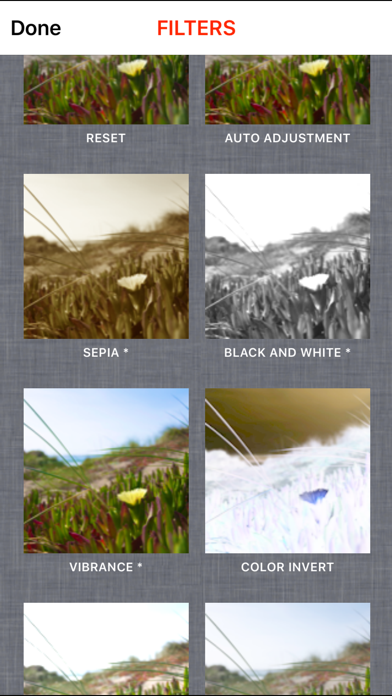


Description by Gianluca Natalini Written by the developer, not by AppBrain. Click to read.
Do you want to apply filters all together (one over the other) to get the right combination of filters you want?
Do you want to edit the image and keeping under control the details of the change?
Want to compare the action of the filters available watching the preview images visualized together in one screen (filters action's visual comparison)?
You need the fade function with overlapping of one or more different images?
"Camera with Filters" is the right application for you.
Photographic characteristics:
- Ability to overlay multiple images captured with fading one after the other: if you do not delete the previous captured image (displayed in the workspace for editing), the next captured image can be automatically overlapped (with fading - with or without images autoscaling) to the previous captured image (used as background)
- Ability to overlay multiple images saved into the photo album with the camera's acquired photos: load a photo from the device's photo album and then take a picture, the captured image can be automatically overlapped (with fading - with or without images autoscaling) with the image loaded from the device's photo albums (used as background)
- Ability of overlay of an endless number of photos/images (fading of an infinite number of images or acquired from the device's camera or loaded from the device's photo albums)
- Image capture with the highest resolution supported by the device
- Flash light
- Capture images from external or internal camera
- Automatic saving of captured image in the device's camera roll (device's photo albums)
- Preview of photos taken and ability to cancel immediately the acquired photo
- Automatic White Balance
- Focus and automatic adjustment of the image by touching the screen of the photo-camera (the image to be acquired)
- Ability to send the edited photo with an email
Filters available:
AUTO ADJUSTMENT
SEPIA
BLACK AND WHITE
VIBRANCE
COLOR INVERT
EXPOSURE ADJUST
GAMMA ADJUST
HIGHLIGHT SHADOW ADJUST
HUE ADJUST
TEMPERATURE AND TINT
RED GLASS
GREEN GLASS
BLUE GLASS
YELLOW GLASS
CYAN GLASS
MAGENTA GLASS
WHITE POINT ADJUST
AGING
GAUSSIAN BLUR 9x9 FILTER
GAUSSIAN BLUR 5x5 FILTER
BOX BLUR 3x3 FILTER
SHARPEN 3x3 FILTER
EMBOSS 3x3 FILTER
ABILITY TO COMBINE ALL THE FILTERS AVAILABLE TO OBTAIN AN INFINITE NUMBER OF FILTERS
Editing:
- Ability to apply filters / effects to get the acquired image to obtain the desired effects
- Ability to apply filters / effects to images stored into the device's photo albums to obtain new images
- Ability to combine filters to obtain an infinite number of filters / effects (one after another - equivalent of more than one filter mounted on the same camera)
- Ability to overlay multiple images with fading (or stored into the device's photo albums or acquired by the camera device)
- Ability to save the edited image into the photo album of the device
- Red-eye removal
- Photo rotation
- Area selection
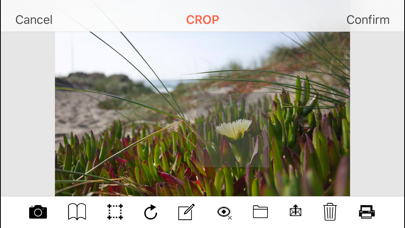
- Crop
- Photo enhance
Editing area:
- Zoom: pinching the screen with two fingers
- Pan: dragging two fingers on the screen
- Reset the zoom and pan: with a double tap
- Triple tap (or specific button) to open the capture interface of the camera
Printing system:
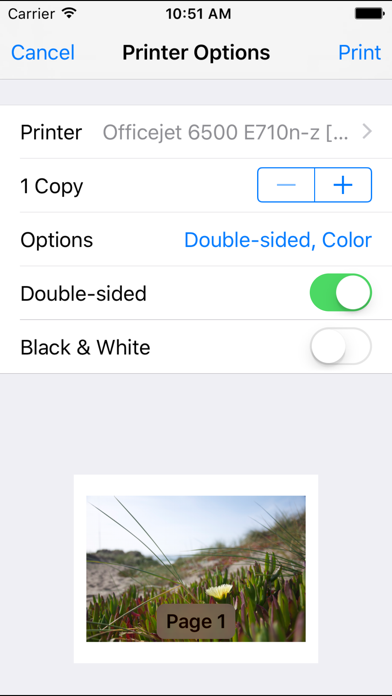
- AirPrint: print Your work with "Camera with Filters" using the HIGH QUALITY PRINTING SYSTEM
Scanner feature:
- take a photo with the "Camera with Filters" photo camera, apply filters such as for example BLACK AND WHITE filter, print all with "Camera with Filters" print button
App type:
- UNIVERSAL APP
Safety and technology
Found in the app by AppBrain- Price
- $0.99
- App size
- 4.38 MB
- Content rating
- Everyone
Technologies used by Camera with Filters
Releases
Updates seen on the App Store- Version
- 2.3
- Launched
- December 2011
No changelog data
Alternatives
Similar apps and more from Gianluca NataliniAlternatives to Camera with Filters





More from Gianluca Natalini





Rankings
App Store top chartsApp Store Rankings for Camera with Filters
About the app and developer
About Camera with Filters
Camera with Filters is a photo & video app developed by Gianluca Natalini.
User Ratings
Camera with Filters is rated 1.00 out of 5 stars. The rating is based on one rating ratings.
App Information
Camera with Filters costs $0.99. The app size is 4.38 MB. The latest version available is 2.3. The last update was on September 21, 2026.
Technical Requirements
The app has a content rating of Everyone. The app has been available on the App Store since December 2011.
Developer information for Gianluca Natalini
Address: